Kiwi Ears Chorus: Is $40 Enough for Great Sound?
Quick Summary
Kiwi Ears Chorus: $40 IEMs with a CNC faceplate, strong sub-bass, and a frequency response that shames headphones costing ten times more.
Kiwi Ears Chorus
Check current price and availability on Amazon
In This Article
Kiwi Ears Chorus: Is $40 Enough for Great Sound?
This article may contain affiliate links. We may earn a commission if you purchase through them, at no extra cost to you.
Related Post

Spend enough time in the audio world and you start to notice a pattern: the price on the box rarely tells you much about the sound inside. A $300 pair of wireless earbuds from a household brand can deliver a frequency response that a well-tuned $40 IEM blows out of the water. The Kiwi Ears Chorus — a collaboration between Kiwi Ears and audio content creator B Media — is exactly that kind of product. It is cheap, it is unpretentious, and it sounds better than it has any right to.
This guide breaks down everything a budget-conscious buyer needs to know: build quality, sound signature, who these are actually for, and whether the price premium for the microphone cable variant is worth it.
What You Get for $40: Specs and Unboxing
The Kiwi Ears Chorus starts at $40 for the standard 3.5mm cable version. There are two upgrades available at checkout: a 3.5mm cable with an inline microphone for $42, and a USB-C cable with microphone for $45. Given that an Apple USB-C audio dongle alone costs around $9, the $5 jump to get a mic-equipped USB-C cable is genuinely reasonable.
Inside the box you'll find:
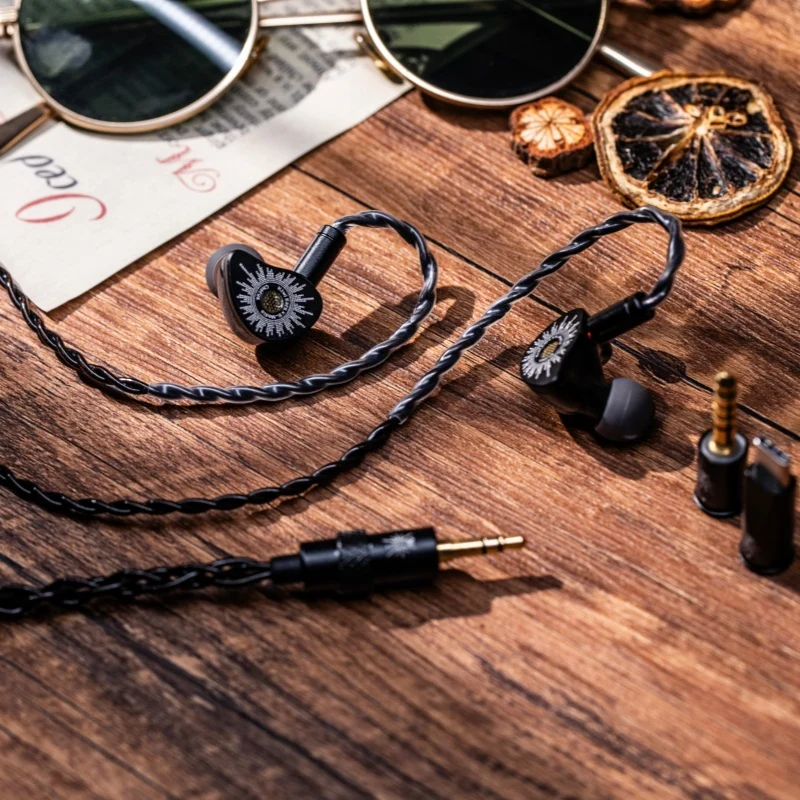
- The IEMs themselves with a CNC-machined metal faceplate
- A 1.2m two-pin detachable cable (variant depends on your order)
- Three sizes of ear tips in two different silicone compounds (softer darker tips and firmer lighter tips)
- A warranty card and a brief wear guide
The two-pin connector standard deserves a special mention. It means that if the cable ever wears out — which is the single most common failure point on any wired IEM — you can replace it for a few dollars on Amazon, Alibaba, or dozens of audio accessory sites. That one design choice dramatically extends the useful life of these earphones compared to hardwired alternatives.
The driver inside is a single DLC (diamond-like carbon) dynamic driver. At 32 ohms impedance and a sensitivity of 103 dB/mW, these are extremely easy to drive. You do not need a DAC, an amplifier, or any special equipment. Plug them into a phone, a laptop headphone jack, or a basic dongle and they will perform as intended.
Build Quality: Punching Above Their Weight
At $40, you might expect plastic housings with a vaguely premium paint job. The Chorus delivers something more considered. The faceplate is CNC-machined metal, featuring the B Media radial logo design — and it looks genuinely good. There is a mesh filter over the nozzle to block earwax from reaching the driver, and what appears to be a rear vent for pressure relief, which is a thoughtful inclusion on a dynamic driver IEM at this price.
The nozzle measures approximately 6.2mm at its widest point, which sits in the middle of the road — not uncomfortably large, but not so narrow that tip selection becomes an afterthought. Left and right channels are clearly marked on the shells, with the cable reinforcing this via a red right-channel indicator. Basic, effective.
The detachable cable is the other structural highlight. Two-pin connectors click in firmly and are not going to rattle loose during a commute. Replacing cables on IEMs used to be a premium feature. Here it is just standard practice, and that matters when you are thinking about long-term ownership costs.
Sound Quality: The Frequency Response That Matters
This is where the Kiwi Ears Chorus earns its reputation — and where a little technical context pays off.
When audio reviewers measure IEMs, they use a standardised artificial ear to capture a frequency response curve, which is then compared against an established target range based on population-averaged listener preferences. Products that fall within this range tend to be perceived as balanced and high quality by the majority of listeners.
Here is how the Chorus plots out:
Sub-bass: Extended and present without being bloated. The low end reaches down into the deepest registers of human hearing and holds close to flat. If you listen to electronic music, hip-hop, or anything with genuine low-end weight, you will feel this — in a good way.
Bass and lower midrange: There is added warmth here, slightly above the average preference target. The result is a sound that is rich and full-bodied rather than sterile. It suits most mainstream genres well.
Midrange: This is the one honest criticism. There is a mild recess in the middle of the midrange band — around the frequencies where the fundamental of a guitar or the body of a male vocal lives. Some instruments will sound slightly more distant or recessed than a perfectly flat response would render them. It is not a dealbreaker, but it is the most noticeable tuning compromise in the entire range.
Upper midrange and presence region (roughly 1.5kHz–6kHz): This is where the Chorus genuinely excels. This region, which governs clarity, the presence of female vocals, the articulation of percussion, and the detail that makes music feel alive, sits comfortably within the preference target. For many listeners, this will be the dominant impression of the headphone: clear, present, and not fatiguing.
Treble (above 6kHz): There is a mild peak around 8kHz that remains within acceptable bounds. Using a wider-bore ear tip — the reviewer recommends inexpensive "coffee tips" available on Amazon for around $9 — can tame this slightly and simultaneously lift the lower treble, which improves perceived air and extension for most listeners.
To put this in perspective: this $40 IEM's measured frequency response compares favourably to the Sony WF-1000XM6, a flagship wireless IEM that retails for several hundred dollars and uses onboard digital signal processing to tune its sound. The Chorus achieves a comparable result through purely physical acoustic tuning — driver selection, housing geometry, and nozzle design. That is a remarkable engineering outcome at any price point.
The Case for Wired IEMs in a Wireless World
It is worth stepping back and addressing the obvious objection: in an era of AirPods and Galaxy Buds, why buy wired IEMs at all?
The answer comes down to longevity, repairability, and sound-per-dollar.
True wireless earbuds contain batteries. Those batteries degrade. After two to three years of regular use, most TWS earbuds are holding a fraction of their original charge — and in many cases the batteries are not user-replaceable. You are not buying a product; you are renting one on a timer.
The Chorus has no battery. The cable can be swapped for under $10. The ear tips can be replaced. The housing is metal and solid. There is no firmware to go wrong, no Bluetooth codec to argue about, no charging case to lose. For a listener who primarily uses earphones at a desk, commuting with a phone in a pocket, or working out with a DAP, wired IEMs remain a pragmatic and acoustically superior choice.
You can buy six pairs of the Kiwi Ears Chorus for the price of a single pair of AirPods Pro. If one pair gets damaged, lost, or simply worn out, you replace it without a second thought.
Pros and Cons
Pros
- Exceptional frequency response for the price, measured objectively
- CNC metal faceplate — looks and feels more expensive than it is
- Detachable two-pin cable dramatically extends product lifespan
- Three cable options including USB-C with microphone
- Easy to drive from any source — no DAC or amp required
- Replaceable ear tips improve fit and can further tune the sound
- No battery means no degradation over time
Cons
- Mild midrange recess affects guitar fundamentals and some male vocals
- No active noise cancellation or transparency mode
- Stock ear tips are functional but not exceptional — a $9 upgrade improves comfort and sound
- Wired-only: not suitable for gym use or contexts where cables are impractical
- Limited brand recognition may put off buyers who rely on name familiarity
Competitor Comparison
Free Weekly Newsletter
Enjoying this guide?
Get the best articles like this one delivered to your inbox every week. No spam.
| Product | Price | Driver Type | Cable | ANC | Replaceable Cable |
|---|---|---|---|---|---|
| Kiwi Ears Chorus | $40–$45 | Single DLC Dynamic | Detachable 2-pin | No | Yes |
| Moondrop Chu II | ~$20 | Single Dynamic | Fixed | No | No |
| 7Hz Salnotes Zero | ~$20 | Single Dynamic | Fixed | No | No |
| CCA CRA+ | ~$15 | Single Dynamic | Detachable 2-pin | No | Yes |
| Sony WF-1000XM6 | $280+ | Dynamic + DSP | N/A (TWS) | Yes | No |
| Apple AirPods Pro 3 | $249 | Dynamic + DSP | N/A (TWS) | Yes | No |
At its price point, the Chorus faces competition primarily from the Moondrop Chu II and 7Hz Salnotes Zero, both of which cost around half the price. Those are legitimate alternatives for the most budget-constrained buyer. The Chorus justifies its higher cost with the detachable cable system, the premium faceplate construction, the included tip variety, and a slightly more refined tuning — particularly in the treble region.
Verdict and Rating
The Kiwi Ears Chorus is the kind of product that makes it difficult to argue for spending more on audio without a very specific reason. It is not perfect — that midrange recess is real and audible on certain recordings — but no IEM at any price is perfect, and the compromises here are minor compared to the strengths.
For a first-time IEM buyer stepping away from earbuds that came free with a phone, this is an exceptional starting point. For an experienced listener who wants a reliable, well-tuned, repairable daily driver without spending real money, it belongs in the shortlist. For anyone currently considering a major-brand true wireless option at five to ten times the price purely for audio quality: stop, and buy this instead.
The missing 1.5 points are for the midrange recess, the need for a tip upgrade to get the best out of the treble, and the lack of any wireless option for buyers who need it. Everything else is close to exemplary for the price.
Where to Buy
Frequently Asked Questions
Q: Are the Kiwi Ears Chorus worth buying if I already own wireless earbuds? Yes, with a caveat. If you use earphones primarily in situations where a cable is practical — at a desk, commuting with a phone in a bag, or listening at home — the Chorus will likely sound noticeably better than most true wireless earbuds in the same or higher price bracket. The trade-off is that you lose ANC and the convenience of no cable. If you need both hands free and a clean neckline constantly, stick with TWS.
Q: Do I need a special DAC or amplifier to use the Kiwi Ears Chorus? No. At 32 ohms and 103 dB/mW sensitivity, these drive easily from a phone headphone jack, a USB-C dongle, a laptop output, or a basic portable DAP. You will not hear a meaningful improvement by adding an expensive desktop DAC unless your source device has audible noise or distortion issues of its own.
Q: What ear tips work best with the Kiwi Ears Chorus? The stock tips are acceptable and will work fine for most listeners. For improved comfort and a slightly smoother treble response, a wide-bore silicone tip — often referred to as "coffee tips" — is a popular and inexpensive upgrade (around $9 on Amazon). Wide-bore tips reduce the 8kHz peak slightly and tend to improve the sense of air and extension in the upper frequencies. Tip fit is personal, so experimenting with the included sizes and compounds first is advisable before spending extra.
Q: Who are the Kiwi Ears Chorus NOT suitable for? These are not the right choice for: listeners who require active noise cancellation for travel or open-plan offices; gym users who need a truly wireless, sweat-resistant form factor; or listeners who are very sensitive to midrange recession and prioritise forward, present guitar and lower-vocal reproduction above all else. They are also purely passive, so buyers wanting app-controlled EQ, touch controls, or a companion app will need to look elsewhere.
Q: How does the $45 USB-C with microphone version compare to the base $40 model? Acoustically, they are identical — the driver, housing, and tuning do not change between cable variants. The $5 premium buys you a USB-C termination (useful for phones or laptops without a 3.5mm jack) and an inline microphone for calls. Given that a standalone USB-C audio adapter costs around $9, the $5 surcharge for a purpose-built cable with a mic is genuinely good value and worth considering if you plan to use these for voice calls or video meetings.
Kiwi Ears Chorus
Considering it? See where the price stands today
Free Investing Tools
Frequently Asked Questions
What You Get for $40: Specs and Unboxing
The Kiwi Ears Chorus starts at $40 for the standard 3.5mm cable version. There are two upgrades available at checkout: a 3.5mm cable with an inline microphone for $42, and a USB-C cable with microphone for $45. Given that an Apple USB-C audio dongle alone costs around $9, the $5 jump to get a mic-equipped USB-C cable is genuinely reasonable.
Inside the box you'll find:
- The IEMs themselves with a CNC-machined metal faceplate
- A 1.2m two-pin detachable cable (variant depends on your order)
- Three sizes of ear tips in two different silicone compounds (softer darker tips and firmer lighter tips)
- A warranty card and a brief wear guide
The two-pin connector standard deserves a special mention. It means that if the cable ever wears out — which is the single most common failure point on any wired IEM — you can replace it for a few dollars on Amazon, Alibaba, or dozens of audio accessory sites. That one design choice dramatically extends the useful life of these earphones compared to hardwired alternatives.
The driver inside is a single DLC (diamond-like carbon) dynamic driver. At 32 ohms impedance and a sensitivity of 103 dB/mW, these are extremely easy to drive. You do not need a DAC, an amplifier, or any special equipment. Plug them into a phone, a laptop headphone jack, or a basic dongle and they will perform as intended.
Build Quality: Punching Above Their Weight
At $40, you might expect plastic housings with a vaguely premium paint job. The Chorus delivers something more considered. The faceplate is CNC-machined metal, featuring the B Media radial logo design — and it looks genuinely good. There is a mesh filter over the nozzle to block earwax from reaching the driver, and what appears to be a rear vent for pressure relief, which is a thoughtful inclusion on a dynamic driver IEM at this price.
The nozzle measures approximately 6.2mm at its widest point, which sits in the middle of the road — not uncomfortably large, but not so narrow that tip selection becomes an afterthought. Left and right channels are clearly marked on the shells, with the cable reinforcing this via a red right-channel indicator. Basic, effective.
The detachable cable is the other structural highlight. Two-pin connectors click in firmly and are not going to rattle loose during a commute. Replacing cables on IEMs used to be a premium feature. Here it is just standard practice, and that matters when you are thinking about long-term ownership costs.
Sound Quality: The Frequency Response That Matters
This is where the Kiwi Ears Chorus earns its reputation — and where a little technical context pays off.
When audio reviewers measure IEMs, they use a standardised artificial ear to capture a frequency response curve, which is then compared against an established target range based on population-averaged listener preferences. Products that fall within this range tend to be perceived as balanced and high quality by the majority of listeners.
Here is how the Chorus plots out:
Sub-bass: Extended and present without being bloated. The low end reaches down into the deepest registers of human hearing and holds close to flat. If you listen to electronic music, hip-hop, or anything with genuine low-end weight, you will feel this — in a good way.
Bass and lower midrange: There is added warmth here, slightly above the average preference target. The result is a sound that is rich and full-bodied rather than sterile. It suits most mainstream genres well.
Midrange: This is the one honest criticism. There is a mild recess in the middle of the midrange band — around the frequencies where the fundamental of a guitar or the body of a male vocal lives. Some instruments will sound slightly more distant or recessed than a perfectly flat response would render them. It is not a dealbreaker, but it is the most noticeable tuning compromise in the entire range.
Upper midrange and presence region (roughly 1.5kHz–6kHz): This is where the Chorus genuinely excels. This region, which governs clarity, the presence of female vocals, the articulation of percussion, and the detail that makes music feel alive, sits comfortably within the preference target. For many listeners, this will be the dominant impression of the headphone: clear, present, and not fatiguing.
Treble (above 6kHz): There is a mild peak around 8kHz that remains within acceptable bounds. Using a wider-bore ear tip — the reviewer recommends inexpensive "coffee tips" available on Amazon for around $9 — can tame this slightly and simultaneously lift the lower treble, which improves perceived air and extension for most listeners.
To put this in perspective: this $40 IEM's measured frequency response compares favourably to the Sony WF-1000XM6, a flagship wireless IEM that retails for several hundred dollars and uses onboard digital signal processing to tune its sound. The Chorus achieves a comparable result through purely physical acoustic tuning — driver selection, housing geometry, and nozzle design. That is a remarkable engineering outcome at any price point.
The Case for Wired IEMs in a Wireless World
It is worth stepping back and addressing the obvious objection: in an era of AirPods and Galaxy Buds, why buy wired IEMs at all?
The answer comes down to longevity, repairability, and sound-per-dollar.
True wireless earbuds contain batteries. Those batteries degrade. After two to three years of regular use, most TWS earbuds are holding a fraction of their original charge — and in many cases the batteries are not user-replaceable. You are not buying a product; you are renting one on a timer.
The Chorus has no battery. The cable can be swapped for under $10. The ear tips can be replaced. The housing is metal and solid. There is no firmware to go wrong, no Bluetooth codec to argue about, no charging case to lose. For a listener who primarily uses earphones at a desk, commuting with a phone in a pocket, or working out with a DAP, wired IEMs remain a pragmatic and acoustically superior choice.
You can buy six pairs of the Kiwi Ears Chorus for the price of a single pair of AirPods Pro. If one pair gets damaged, lost, or simply worn out, you replace it without a second thought.
Pros and Cons
Pros
- Exceptional frequency response for the price, measured objectively
- CNC metal faceplate — looks and feels more expensive than it is
- Detachable two-pin cable dramatically extends product lifespan
- Three cable options including USB-C with microphone
- Easy to drive from any source — no DAC or amp required
- Replaceable ear tips improve fit and can further tune the sound
- No battery means no degradation over time
Cons
- Mild midrange recess affects guitar fundamentals and some male vocals
- No active noise cancellation or transparency mode
- Stock ear tips are functional but not exceptional — a $9 upgrade improves comfort and sound
- Wired-only: not suitable for gym use or contexts where cables are impractical
- Limited brand recognition may put off buyers who rely on name familiarity
Competitor Comparison
| Product | Price | Driver Type | Cable | ANC | Replaceable Cable |
|---|---|---|---|---|---|
| Kiwi Ears Chorus | $40–$45 | Single DLC Dynamic | Detachable 2-pin | No | Yes |
| Moondrop Chu II | ~$20 | Single Dynamic | Fixed | No | No |
| 7Hz Salnotes Zero | ~$20 | Single Dynamic | Fixed | No | No |
| CCA CRA+ | ~$15 | Single Dynamic | Detachable 2-pin | No | Yes |
| Sony WF-1000XM6 | $280+ | Dynamic + DSP | N/A (TWS) | Yes | No |
| Apple AirPods Pro 3 | $249 | Dynamic + DSP | N/A (TWS) | Yes | No |
At its price point, the Chorus faces competition primarily from the Moondrop Chu II and 7Hz Salnotes Zero, both of which cost around half the price. Those are legitimate alternatives for the most budget-constrained buyer. The Chorus justifies its higher cost with the detachable cable system, the premium faceplate construction, the included tip variety, and a slightly more refined tuning — particularly in the treble region.
Verdict and Rating
The Kiwi Ears Chorus is the kind of product that makes it difficult to argue for spending more on audio without a very specific reason. It is not perfect — that midrange recess is real and audible on certain recordings — but no IEM at any price is perfect, and the compromises here are minor compared to the strengths.
For a first-time IEM buyer stepping away from earbuds that came free with a phone, this is an exceptional starting point. For an experienced listener who wants a reliable, well-tuned, repairable daily driver without spending real money, it belongs in the shortlist. For anyone currently considering a major-brand true wireless option at five to ten times the price purely for audio quality: stop, and buy this instead.
The missing 1.5 points are for the midrange recess, the need for a tip upgrade to get the best out of the treble, and the lack of any wireless option for buyers who need it. Everything else is close to exemplary for the price.
Where to Buy
Frequently Asked Questions
Q: Are the Kiwi Ears Chorus worth buying if I already own wireless earbuds? Yes, with a caveat. If you use earphones primarily in situations where a cable is practical — at a desk, commuting with a phone in a bag, or listening at home — the Chorus will likely sound noticeably better than most true wireless earbuds in the same or higher price bracket. The trade-off is that you lose ANC and the convenience of no cable. If you need both hands free and a clean neckline constantly, stick with TWS.
Q: Do I need a special DAC or amplifier to use the Kiwi Ears Chorus? No. At 32 ohms and 103 dB/mW sensitivity, these drive easily from a phone headphone jack, a USB-C dongle, a laptop output, or a basic portable DAP. You will not hear a meaningful improvement by adding an expensive desktop DAC unless your source device has audible noise or distortion issues of its own.
Q: What ear tips work best with the Kiwi Ears Chorus? The stock tips are acceptable and will work fine for most listeners. For improved comfort and a slightly smoother treble response, a wide-bore silicone tip — often referred to as "coffee tips" — is a popular and inexpensive upgrade (around $9 on Amazon). Wide-bore tips reduce the 8kHz peak slightly and tend to improve the sense of air and extension in the upper frequencies. Tip fit is personal, so experimenting with the included sizes and compounds first is advisable before spending extra.
Q: Who are the Kiwi Ears Chorus NOT suitable for? These are not the right choice for: listeners who require active noise cancellation for travel or open-plan offices; gym users who need a truly wireless, sweat-resistant form factor; or listeners who are very sensitive to midrange recession and prioritise forward, present guitar and lower-vocal reproduction above all else. They are also purely passive, so buyers wanting app-controlled EQ, touch controls, or a companion app will need to look elsewhere.
Q: How does the $45 USB-C with microphone version compare to the base $40 model? Acoustically, they are identical — the driver, housing, and tuning do not change between cable variants. The $5 premium buys you a USB-C termination (useful for phones or laptops without a 3.5mm jack) and an inline microphone for calls. Given that a standalone USB-C audio adapter costs around $9, the $5 surcharge for a purpose-built cable with a mic is genuinely good value and worth considering if you plan to use these for voice calls or video meetings.
Kiwi Ears Chorus
Ready to decide? Compare the current price before you buy
About Zeebrain Editorial
Zeebrain publishes independent analysis of markets, investing, personal finance, and business. We disclose affiliate relationships, never accept payment for coverage, and fact-check all claims against primary sources. Read our editorial policy →
How this article was produced: Zeebrain articles are created with AI assistance from primary sources (including cited videos and market data) and reviewed under our editorial standards before publication. Spot an error? Tell us and we will correct it.
Disclaimer: Content on Zeebrain is for informational and educational purposes only and does not constitute financial advice or a recommendation to buy or sell any security. Always conduct your own research and consult a qualified financial adviser before making investment decisions. Past performance is not indicative of future results.
More from Reviews




Related Guides
Keep exploring this topic
Explore More on Zeebrain
Keep browsing by topic, or put the numbers to work with our free tools.