Infomaker K1 CNC Machine: Desktop Metal Machining
Quick Summary
Infomaker K1: a compact 5-axis desktop CNC machine for beginners. Real specs, pricing, pros, cons, and who should buy it.
Infomaker K1 CNC Machine
Check current price and availability on Amazon
In This Article
Infomaker K1 CNC Machine Review: Is This the Desktop CNC for Beginners?
This article may contain affiliate links. We may earn a commission if you purchase through them, at no extra cost to you.
Related Post

For years, CNC machining has sat behind a thick wall of specialised knowledge, expensive software licences, and industrial-sized equipment that belongs in a factory — not a home studio or small design office. The Infomaker K1 wants to knock that wall down. This compact, five-axis desktop CNC machine targets the maker, the product designer, the jeweller, and the curious technologist who has always wanted to work in real metal but found the entry barrier too steep. At early-bird Kickstarter pricing under $6,000 USD, it is not cheap — but it is significantly cheaper than traditional CNC setups when you factor in the software, training, and floor space those systems demand.
Is the K1 genuinely beginner-friendly, or is "easy CNC" just clever marketing? We dug into the specs, the use cases, and the real costs to give you an honest verdict.
What Exactly Is the Infomaker K1?
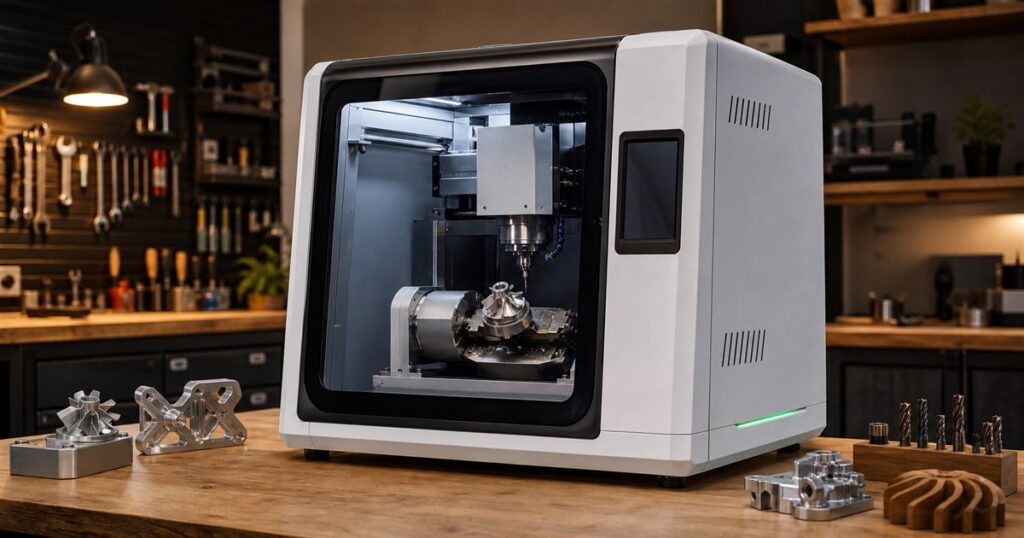
The Infomaker K1 is a five-axis desktop CNC (Computer Numerical Control) machine designed to bring subtractive manufacturing — the process of cutting material away from a solid block to create a finished object — into a desktop environment. Unlike 3D printers, which add material layer by layer, CNC machines remove material with rotating cutting tools. That distinction matters enormously for quality, material range, and practical application.
The K1 supports an impressive list of workable materials: aluminum, brass, stainless steel, red copper, titanium, hardwood, acrylic, epoxy tooling board, jewelry wax, and even jade. That range alone separates it from any desktop 3D printer on the market. You cannot print a functional brass fitting or a titanium prototype on an FDM printer. You can machine one on the K1.
The five axes — X, Y, Z, B, and C — allow the cutting tool to approach the workpiece from multiple angles without the operator repositioning it manually. That capability unlocks complex geometries: undercuts, curved surfaces, and intricate detail work that a simpler three-axis machine cannot produce in a single setup.
The machine is fully enclosed, which is critical for two reasons. First, it contains the metal chips, dust, and coolant that CNC machining produces. Second, enclosure protects the precision components inside from vibration and contamination. Infomaker supplies a distilled water cooling system via an integrated tube and reservoir — a necessary feature when cutting metals, where friction generates enough heat to damage both the workpiece and the cutting tool.
Weight sits at over 100 kg. That is heavy for a desk item, but Infomaker argues — credibly — that mass is directly tied to precision. Vibration is the enemy of accurate machining. A lightweight frame flexes; a heavy one does not.
The Software: Where the K1 Actually Earns Its "Beginner" Label
Hardware is only half the story with CNC machines. The traditional workflow involves CAD (Computer-Aided Design) software to model the part, CAM (Computer-Aided Manufacturing) software to generate toolpaths, and then post-processing to translate those toolpaths into machine-readable G-code. Each step requires training. Professional machinists spend months or years developing this competency.
Infomaker's approach is to collapse that workflow into a single interface with two key features that change the game for novices.
2D-to-3D Conversion: Users can import a flat 2D image and the software will generate a three-dimensional model suitable for machining. This is not a perfect substitute for parametric CAD modelling, but for decorative objects, logos, relief carvings, and simple functional parts, it works surprisingly well.
Text-to-Object (Natural Language Input): This is the more impressive feature. Users describe what they want in plain language, and the software generates a 3D model ready for machining. Describe an object, review the model, hit run. For someone with zero CAD experience, this is genuinely transformative. It shifts the skill requirement from technical modelling to clear communication — something most people already possess.
The machine also features an on-device display that provides real-time job status, and it supports automatic tool changing. Load the tool magazine once, and the K1 switches between cutters as the job demands without operator intervention. That is a feature found on professional machining centres costing many times the K1's price.
Real-World Use Cases: Beyond the Demo Reel
Demo videos from manufacturers are always optimistic. So let's talk about who actually has a legitimate use case for the Infomaker K1.
Product Designers and Prototypers: This is the primary market, and it is a strong fit. The ability to produce metal prototypes in-house — rather than outsourcing to a machine shop with multi-week lead times — compresses the product development cycle dramatically. An aluminum prototype that might cost $300–$800 from an external supplier and take two weeks can be produced in-house in hours.
Jewellers and Custom Makers: The K1 supports jewelry wax, which is the standard material for lost-wax casting — the process used to produce custom rings, pendants, and other fine pieces. A jeweller could design in wax on the K1 and send directly to casting. Titanium and brass support adds further flexibility for direct-cut jewelry production.
Small Business Owners and Brand Builders: Custom wooden desk accessories, branded metal components, acrylic signage — the K1 can produce small-batch finished goods that would otherwise require minimum order quantities from manufacturers.
Hobbyist Engineers and Tinkerers: Anyone who has hit the ceiling of what 3D printing can deliver — particularly in terms of material strength, surface finish, and dimensional accuracy — will find the K1 opens doors that were previously shut.
What it is NOT for: High-volume production. The K1 is a single-machine desktop unit. Cycle times for metal machining are measured in hours, not minutes. If you need 500 identical parts, this is a prototyping tool, not a production solution.
Infomaker K1 vs. Competing Desktop CNC Options
The desktop CNC space is still maturing, but the K1 does have competition worth acknowledging.
| Feature | Infomaker K1 | Snapmaker Artisan CNC | Carbide 3D Nomad 3 | Bantam Tools Desktop CNC |
|---|---|---|---|---|
| Axes | 5-axis | 3-axis | 3-axis | 3-axis |
| Metal Capability | Yes (Al, brass, Ti, steel) | Limited (soft metals) | Aluminum (limited) | Aluminum, brass |
| Auto Tool Change | Yes | No | No | No |
| Natural Language Input | Yes | No | No | No |
| Enclosure | Fully enclosed | Partially enclosed | Fully enclosed | Fully enclosed |
| Weight | 100+ kg | ~35 kg | ~27 kg | ~29 kg |
| Price (approx.) | ~$6,000 (early bird) | ~$1,800–$2,500 | ~$2,800 | ~$3,800–$4,500 |
| Target User | Beginner to intermediate | Maker/hobbyist | Hobbyist | Professional hobbyist |
The K1's five-axis capability and natural language software are genuine differentiators at this price point. Competing machines in the $2,000–$4,500 range are three-axis only, which limits geometry complexity significantly. The trade-off is price and weight — the K1 costs more and weighs considerably more than any competitor listed above.
Infomaker K1: Pros and Cons
Pros
- Five-axis machining at desktop scale — rare below $20,000 in traditional CNC
- Natural language text-to-object removes the CAD knowledge barrier entirely
- Wide material range including titanium, stainless steel, and jade
- Automatic tool changing reduces operator intervention during long jobs
- Fully enclosed design for safety and cleanliness
- On-device display for real-time job monitoring
- Early-bird pricing under $6,000 — competitive for five-axis capability
Cons
- Over 100 kg — this is a desk item in footprint only; moving it requires planning and assistance
- Kickstarter product — production quality, lead times, and after-sales support are unproven at scale
- $6,000 price point is still a significant investment for hobbyists and small operations
- Not a production machine — cycle times limit throughput to prototyping and small-batch work
- Coolant system maintenance — distilled water cooling adds an ongoing operational task
- Software ecosystem is proprietary — if Infomaker discontinues support, the software advantage disappears
Pricing and Value Assessment
The early-bird Kickstarter price sits under $6,000 USD. For context:
- A professional three-axis CNC milling machine from an established brand typically starts at $8,000–$15,000 for a comparable working envelope, before software costs.
- Five-axis machining centres from industrial suppliers start at $30,000–$50,000 and scale upward from there.
- Outsourcing a single aluminum prototype to a machine shop: $200–$1,000+ depending on complexity and lead time.
For a designer, engineer, or jeweller producing even five to ten custom prototypes per month, the K1 could pay for itself in outsourcing cost savings within one to two years. For a pure hobbyist producing one item per month, the economics are harder to justify — though the creative freedom has its own value.
Free Weekly Newsletter
Enjoying this guide?
Get the best articles like this one delivered to your inbox every week. No spam.
The Kickstarter model introduces risk. Backers are funding a product that has been demonstrated but not yet shipped at scale. That is a meaningful consideration for a $6,000 commitment. Research Infomaker's team background, manufacturing partnerships, and backer communication history before committing.
Overall Verdict
The Infomaker K1 is the most credible attempt yet to make five-axis CNC machining accessible to non-specialists. The natural language input system is not a gimmick — it is a genuine innovation that removes the single biggest barrier to entry in CNC: CAD competency. The material range is broader than anything else in this price bracket, and automatic tool changing is a professional-grade feature that saves real time and frustration.
The caveats are real, though. Buying a Kickstarter product at this price point requires trust in an unproven production and support track record. The weight makes "desktop" a loose description. And $6,000 — while competitive for five-axis capability — is not impulse-purchase territory.
For the product designer who currently pays outsourcing fees for every prototype iteration, the jeweller who wants wax-cut precision in-house, or the serious maker who has outgrown 3D printing's material limitations, the K1 makes a compelling case. For the casual hobbyist or someone just curious about CNC, the investment is hard to justify at this stage.
Bottom line: If you have a genuine professional or serious creative need for in-house metal machining, the Infomaker K1 is worth backing. If you are experimenting, wait for retail availability and user reviews before committing $6,000.
Where to Buy
The Infomaker K1 is currently available through its Kickstarter campaign. For related CNC accessories, tooling, and comparable desktop CNC machines, you can browse options here:
Frequently Asked Questions
Is the Infomaker K1 suitable for complete beginners with no CNC or CAD experience?
Yes — with caveats. The natural language text-to-object input and 2D-to-3D image conversion genuinely lower the barrier to entry far below any traditional CNC machine. A complete beginner can produce simple to moderately complex objects without learning CAD software. However, producing precision functional parts still benefits from some understanding of machining principles — feeds, speeds, material behaviour, and fixturing. The K1 makes CNC approachable; it does not make expertise irrelevant for demanding work.
How does the Infomaker K1 compare to a high-end 3D printer at a similar price point?
At $6,000, you could buy a professional-grade resin or FDM 3D printer with an established track record. The key difference is materials and finished quality. A $6,000 3D printer produces plastic parts (or resin parts) with excellent detail but limited structural and thermal performance. The K1 produces parts in aluminum, brass, stainless steel, titanium, and hardwood — materials with real-world mechanical properties that plastics cannot match. If your application requires metal, wood, or acrylic with machined surface finish, the K1 is not competing with 3D printers; it is doing something fundamentally different.
What ongoing costs should I budget for beyond the purchase price?
Plan for: replacement cutting tools (end mills and drills wear out, especially in metal — budget $50–$200+ per month depending on usage), distilled water for the cooling system, material stock (aluminum, brass, and titanium billets are not cheap), and potentially fixturing hardware to hold workpieces securely. Software costs are currently bundled, but verify the long-term licensing model with Infomaker before purchasing.
Who should NOT buy the Infomaker K1?
Three categories of buyer should hesitate. First, pure hobbyists without a specific recurring use case — the economics simply do not justify $6,000 for occasional use. Second, anyone who needs production volumes — the K1 is a prototyping and small-batch tool, not a production machine. Third, risk-averse buyers — as a Kickstarter product, it carries the inherent uncertainty of any crowdfunded hardware campaign. If you need a proven machine with established support infrastructure today, look at Carbide 3D, Bantam Tools, or used professional CNC equipment from established manufacturers instead.
Infomaker K1 CNC Machine
Considering it? See where the price stands today
Frequently Asked Questions
What Exactly Is the Infomaker K1?
The Infomaker K1 is a five-axis desktop CNC (Computer Numerical Control) machine designed to bring subtractive manufacturing — the process of cutting material away from a solid block to create a finished object — into a desktop environment. Unlike 3D printers, which add material layer by layer, CNC machines remove material with rotating cutting tools. That distinction matters enormously for quality, material range, and practical application.
The K1 supports an impressive list of workable materials: aluminum, brass, stainless steel, red copper, titanium, hardwood, acrylic, epoxy tooling board, jewelry wax, and even jade. That range alone separates it from any desktop 3D printer on the market. You cannot print a functional brass fitting or a titanium prototype on an FDM printer. You can machine one on the K1.
The five axes — X, Y, Z, B, and C — allow the cutting tool to approach the workpiece from multiple angles without the operator repositioning it manually. That capability unlocks complex geometries: undercuts, curved surfaces, and intricate detail work that a simpler three-axis machine cannot produce in a single setup.
The machine is fully enclosed, which is critical for two reasons. First, it contains the metal chips, dust, and coolant that CNC machining produces. Second, enclosure protects the precision components inside from vibration and contamination. Infomaker supplies a distilled water cooling system via an integrated tube and reservoir — a necessary feature when cutting metals, where friction generates enough heat to damage both the workpiece and the cutting tool.
Weight sits at over 100 kg. That is heavy for a desk item, but Infomaker argues — credibly — that mass is directly tied to precision. Vibration is the enemy of accurate machining. A lightweight frame flexes; a heavy one does not.
The Software: Where the K1 Actually Earns Its "Beginner" Label
Hardware is only half the story with CNC machines. The traditional workflow involves CAD (Computer-Aided Design) software to model the part, CAM (Computer-Aided Manufacturing) software to generate toolpaths, and then post-processing to translate those toolpaths into machine-readable G-code. Each step requires training. Professional machinists spend months or years developing this competency.
Infomaker's approach is to collapse that workflow into a single interface with two key features that change the game for novices.
2D-to-3D Conversion: Users can import a flat 2D image and the software will generate a three-dimensional model suitable for machining. This is not a perfect substitute for parametric CAD modelling, but for decorative objects, logos, relief carvings, and simple functional parts, it works surprisingly well.
Text-to-Object (Natural Language Input): This is the more impressive feature. Users describe what they want in plain language, and the software generates a 3D model ready for machining. Describe an object, review the model, hit run. For someone with zero CAD experience, this is genuinely transformative. It shifts the skill requirement from technical modelling to clear communication — something most people already possess.
The machine also features an on-device display that provides real-time job status, and it supports automatic tool changing. Load the tool magazine once, and the K1 switches between cutters as the job demands without operator intervention. That is a feature found on professional machining centres costing many times the K1's price.
Real-World Use Cases: Beyond the Demo Reel
Demo videos from manufacturers are always optimistic. So let's talk about who actually has a legitimate use case for the Infomaker K1.
Product Designers and Prototypers: This is the primary market, and it is a strong fit. The ability to produce metal prototypes in-house — rather than outsourcing to a machine shop with multi-week lead times — compresses the product development cycle dramatically. An aluminum prototype that might cost $300–$800 from an external supplier and take two weeks can be produced in-house in hours.
Jewellers and Custom Makers: The K1 supports jewelry wax, which is the standard material for lost-wax casting — the process used to produce custom rings, pendants, and other fine pieces. A jeweller could design in wax on the K1 and send directly to casting. Titanium and brass support adds further flexibility for direct-cut jewelry production.
Small Business Owners and Brand Builders: Custom wooden desk accessories, branded metal components, acrylic signage — the K1 can produce small-batch finished goods that would otherwise require minimum order quantities from manufacturers.
Hobbyist Engineers and Tinkerers: Anyone who has hit the ceiling of what 3D printing can deliver — particularly in terms of material strength, surface finish, and dimensional accuracy — will find the K1 opens doors that were previously shut.
What it is NOT for: High-volume production. The K1 is a single-machine desktop unit. Cycle times for metal machining are measured in hours, not minutes. If you need 500 identical parts, this is a prototyping tool, not a production solution.
Infomaker K1 vs. Competing Desktop CNC Options
The desktop CNC space is still maturing, but the K1 does have competition worth acknowledging.
| Feature | Infomaker K1 | Snapmaker Artisan CNC | Carbide 3D Nomad 3 | Bantam Tools Desktop CNC |
|---|---|---|---|---|
| Axes | 5-axis | 3-axis | 3-axis | 3-axis |
| Metal Capability | Yes (Al, brass, Ti, steel) | Limited (soft metals) | Aluminum (limited) | Aluminum, brass |
| Auto Tool Change | Yes | No | No | No |
| Natural Language Input | Yes | No | No | No |
| Enclosure | Fully enclosed | Partially enclosed | Fully enclosed | Fully enclosed |
| Weight | 100+ kg | ~35 kg | ~27 kg | ~29 kg |
| Price (approx.) | ~$6,000 (early bird) | ~$1,800–$2,500 | ~$2,800 | ~$3,800–$4,500 |
| Target User | Beginner to intermediate | Maker/hobbyist | Hobbyist | Professional hobbyist |
The K1's five-axis capability and natural language software are genuine differentiators at this price point. Competing machines in the $2,000–$4,500 range are three-axis only, which limits geometry complexity significantly. The trade-off is price and weight — the K1 costs more and weighs considerably more than any competitor listed above.
Infomaker K1: Pros and Cons
Pros
- Five-axis machining at desktop scale — rare below $20,000 in traditional CNC
- Natural language text-to-object removes the CAD knowledge barrier entirely
- Wide material range including titanium, stainless steel, and jade
- Automatic tool changing reduces operator intervention during long jobs
- Fully enclosed design for safety and cleanliness
- On-device display for real-time job monitoring
- Early-bird pricing under $6,000 — competitive for five-axis capability
Cons
- Over 100 kg — this is a desk item in footprint only; moving it requires planning and assistance
- Kickstarter product — production quality, lead times, and after-sales support are unproven at scale
- $6,000 price point is still a significant investment for hobbyists and small operations
- Not a production machine — cycle times limit throughput to prototyping and small-batch work
- Coolant system maintenance — distilled water cooling adds an ongoing operational task
- Software ecosystem is proprietary — if Infomaker discontinues support, the software advantage disappears
Pricing and Value Assessment
The early-bird Kickstarter price sits under $6,000 USD. For context:
- A professional three-axis CNC milling machine from an established brand typically starts at $8,000–$15,000 for a comparable working envelope, before software costs.
- Five-axis machining centres from industrial suppliers start at $30,000–$50,000 and scale upward from there.
- Outsourcing a single aluminum prototype to a machine shop: $200–$1,000+ depending on complexity and lead time.
For a designer, engineer, or jeweller producing even five to ten custom prototypes per month, the K1 could pay for itself in outsourcing cost savings within one to two years. For a pure hobbyist producing one item per month, the economics are harder to justify — though the creative freedom has its own value.
The Kickstarter model introduces risk. Backers are funding a product that has been demonstrated but not yet shipped at scale. That is a meaningful consideration for a $6,000 commitment. Research Infomaker's team background, manufacturing partnerships, and backer communication history before committing.
Overall Verdict
The Infomaker K1 is the most credible attempt yet to make five-axis CNC machining accessible to non-specialists. The natural language input system is not a gimmick — it is a genuine innovation that removes the single biggest barrier to entry in CNC: CAD competency. The material range is broader than anything else in this price bracket, and automatic tool changing is a professional-grade feature that saves real time and frustration.
The caveats are real, though. Buying a Kickstarter product at this price point requires trust in an unproven production and support track record. The weight makes "desktop" a loose description. And $6,000 — while competitive for five-axis capability — is not impulse-purchase territory.
For the product designer who currently pays outsourcing fees for every prototype iteration, the jeweller who wants wax-cut precision in-house, or the serious maker who has outgrown 3D printing's material limitations, the K1 makes a compelling case. For the casual hobbyist or someone just curious about CNC, the investment is hard to justify at this stage.
Bottom line: If you have a genuine professional or serious creative need for in-house metal machining, the Infomaker K1 is worth backing. If you are experimenting, wait for retail availability and user reviews before committing $6,000.
Where to Buy
The Infomaker K1 is currently available through its Kickstarter campaign. For related CNC accessories, tooling, and comparable desktop CNC machines, you can browse options here:
Frequently Asked Questions
Is the Infomaker K1 suitable for complete beginners with no CNC or CAD experience?
Yes — with caveats. The natural language text-to-object input and 2D-to-3D image conversion genuinely lower the barrier to entry far below any traditional CNC machine. A complete beginner can produce simple to moderately complex objects without learning CAD software. However, producing precision functional parts still benefits from some understanding of machining principles — feeds, speeds, material behaviour, and fixturing. The K1 makes CNC approachable; it does not make expertise irrelevant for demanding work.
How does the Infomaker K1 compare to a high-end 3D printer at a similar price point?
At $6,000, you could buy a professional-grade resin or FDM 3D printer with an established track record. The key difference is materials and finished quality. A $6,000 3D printer produces plastic parts (or resin parts) with excellent detail but limited structural and thermal performance. The K1 produces parts in aluminum, brass, stainless steel, titanium, and hardwood — materials with real-world mechanical properties that plastics cannot match. If your application requires metal, wood, or acrylic with machined surface finish, the K1 is not competing with 3D printers; it is doing something fundamentally different.
What ongoing costs should I budget for beyond the purchase price?
Plan for: replacement cutting tools (end mills and drills wear out, especially in metal — budget $50–$200+ per month depending on usage), distilled water for the cooling system, material stock (aluminum, brass, and titanium billets are not cheap), and potentially fixturing hardware to hold workpieces securely. Software costs are currently bundled, but verify the long-term licensing model with Infomaker before purchasing.
Who should NOT buy the Infomaker K1?
Three categories of buyer should hesitate. First, pure hobbyists without a specific recurring use case — the economics simply do not justify $6,000 for occasional use. Second, anyone who needs production volumes — the K1 is a prototyping and small-batch tool, not a production machine. Third, risk-averse buyers — as a Kickstarter product, it carries the inherent uncertainty of any crowdfunded hardware campaign. If you need a proven machine with established support infrastructure today, look at Carbide 3D, Bantam Tools, or used professional CNC equipment from established manufacturers instead.
Infomaker K1 CNC Machine
Ready to decide? Compare the current price before you buy
About Zeebrain Editorial
Zeebrain publishes independent analysis of markets, investing, personal finance, and business. We disclose affiliate relationships, never accept payment for coverage, and fact-check all claims against primary sources. Read our editorial policy →
How this article was produced: Zeebrain articles are created with AI assistance from primary sources (including cited videos and market data) and reviewed under our editorial standards before publication. Spot an error? Tell us and we will correct it.
Disclaimer: Content on Zeebrain is for informational and educational purposes only and does not constitute financial advice or a recommendation to buy or sell any security. Always conduct your own research and consult a qualified financial adviser before making investment decisions. Past performance is not indicative of future results.
More from Reviews




Related Guides
Keep exploring this topic
Explore More on Zeebrain
Keep browsing by topic, or put the numbers to work with our free tools.