Inside MKBHD 2026 Desk Setup: Full Tool List
Quick Summary
MKBHD reviews every item on his 2026 desk setup — from a $13K Mac Pro to budget keyboard picks. Here's what's worth it and what he's replacing.
Inside MKBHD 2026 Desk Setup
Check current price and availability on Amazon
In This Article
The Setup That Actually Gets Used Every Day
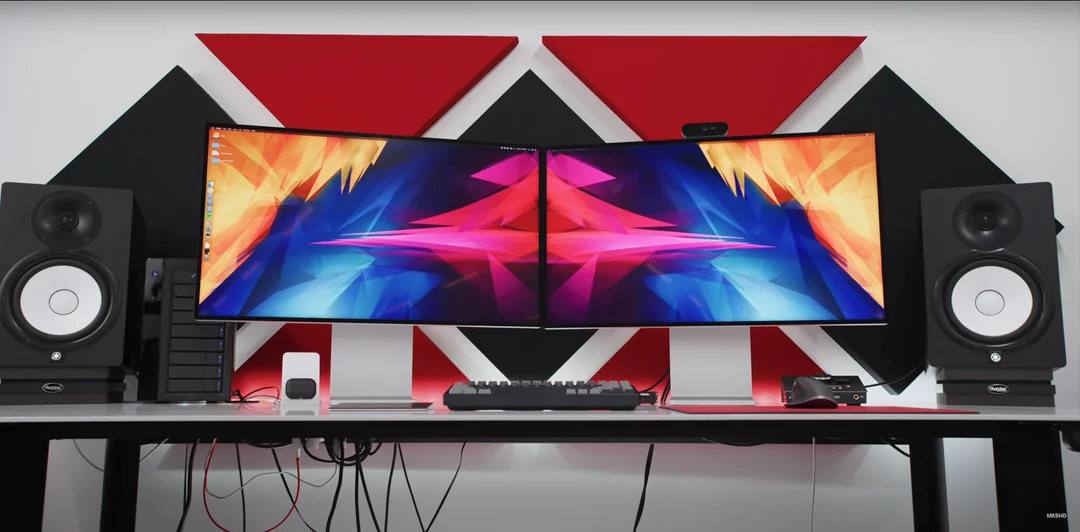
Most desk setup tours are aspirational fiction — gear pulled out of boxes for a pretty thumbnail, never touched again. MKBHD's 2026 desk setup review is the opposite. Marques Brownlee walks through every item on his desk that he has used daily, some for nearly a decade, to produce some of the most-watched tech content on the internet. That context changes everything. When someone who has genuinely logged thousands of hours with a piece of hardware hands it a score, the number means something.
Related Post

This article breaks down every item from that setup, adds the context the video doesn't cover, and gives you a straight answer on what's actually worth your money — and what's a cautionary tale in expensive hardware that hasn't kept pace.
The Desk and Chair: Get These Right First
If you take one lesson from this entire setup, it's this: the furniture matters more than most people admit, and getting it wrong costs you in back pain and productivity long before it costs you in money.
Xesk Next Desk Air Pro (formerly Next Desk) — This is an 8-foot by 3-foot aluminium sit-stand desk, roughly a quarter-inch thick, that has held up without warping, rocking, or flexing for nearly a decade under heavy professional use. The single legitimate complaint is that you have to hold the button to move it to a preset height rather than tapping once. That is a genuinely minor gripe for a desk that is otherwise described as a "forever" piece of furniture. Score: 9/10.
If you're in the market for a sit-stand desk, the lesson here isn't to go out and spend the same amount. It's to prioritise surface stability and build quality above gimmicks. A wobbly desk undermines every premium monitor, keyboard, and accessory sitting on top of it.
Herman Miller Embody — This chair needs little introduction. It has been consistently rated among the best ergonomic office chairs available for years, and it's one of the few pieces of furniture with a genuine second-hand market because people who own them rarely want to give them up. At full retail it is expensive, but refurbished units are available through Herman Miller's certified pre-owned programme and third-party resellers for significantly less. If you spend six or more hours a day at a desk, this is not a luxury — it's a medical device. Score: 10/10.
The Computing Core: When Expensive Hardware Ages Badly
The M2 Ultra Mac Pro is the most instructive item in this entire desk setup review, and not for flattering reasons.
At launch it cost between $12,000 and $13,000. It was Apple's most powerful machine. Today, it is three chip generations behind — M3, M4, and M5 have all shipped — and Apple has not updated the Mac Pro for any of them. The M3 Ultra now lives in the Mac Studio, a machine that costs a fraction of the tower's price and outperforms it in most workflows.
The one reason to keep a Mac Pro rather than migrating to a Mac Studio is PCIe expansion. In this case, a single OWC PCIe SSD card providing 64TB of fast local backup is what justifies the tower's continued presence. That is a legitimate use case, but it is a narrow one. The planned replacement — an M5 Ultra Mac Studio paired with a Thunderbolt OWC SSD for backup — is more practical for almost every professional user.
The budget-conscious lesson: a Mac Studio at the time of the Mac Pro's launch would have aged more gracefully and cost a fraction of the price. Expandability is only worth paying for if you have a specific, confirmed need for it. Score: 4/10.
Apple Pro Display XDR (x2) — At $5,000 per panel, plus $1,000 for the stand and another $1,000 for nano-texture glass, each display in this setup costs $7,000. That is not a typo, and it is not a recommendation for most people. These are professional colour-reference displays used across an entire studio so that every editor is working from a calibrated, matched standard. That is a real and specific professional need.
For everyone else, the 60Hz refresh rate, lack of built-in speakers, and absence of a webcam are hard to justify at this price point. Alternatives like the LG UltraFine 5K or even Apple's own Studio Display offer most of the real-world benefits for dramatically less money. Score: 8/10.
Audio Setup: Where the Quality-to-Cost Ratio Actually Makes Sense
Yamaha HS8 Studio Monitors — These are a genuine sweet spot in the professional monitor market. The HS series has been a studio standard for years precisely because they are honest — they don't flatter your mix, which means if something sounds good on them, it will sound good everywhere. The 8-inch woofer reaches down to around 40Hz, eliminating any need for a separate subwoofer in most editing and listening scenarios. At current retail pricing, a pair of HS8s is one of the more accessible professional-grade audio investments in this entire setup. Minor RF interference from nearby phones is a known quirk, not a defect. Score: 9/10.
Sennheiser HD 650 Headphones — Open-back headphones are a specific choice with real trade-offs. You can hear your environment, and anyone nearby can hear what you're listening to. In a professional studio context where colleagues need to get your attention, that's a feature. In a shared living space or open office, it's a problem. The HD 650 is a decades-old design that has earned its reputation: detailed, natural sound with a comfortable fit for long sessions. Wired connection to a dedicated DAC keeps the signal clean. There is no meaningful upgrade path that doesn't involve significantly more money for diminishing returns. Score: 8/10.
Audio Interface / DAC — The external Thunderbolt DAC unit functions as a central audio hub and volume controller, but the software experience is genuinely poor. Firmware resets, lost configurations after updates, and general instability are recurring issues. The hardware does its job, but the software wrapper around it creates unnecessary friction. If you're building a new audio setup, it is worth researching current alternatives before committing to this category of product. Score: 4/10.
Input Devices: The Peripherals You'll Actually Notice
Rainy 75 Mechanical Keyboard — This is the most accessible high-quality item on the entire desk. The Rainy 75 Light comes in at a price point that makes it genuinely competitive with mainstream office keyboards while offering the build quality, sound, and typing feel of a proper enthusiast board. Mac-compatible layout, wireless connectivity, and solid battery life with backlighting disabled make this a practical daily driver. If you're still using whatever keyboard came with your computer, this is the upgrade that will change how you feel about your desk every single day. Score: 8/10.
Logitech MX Master 4 Mouse — The MX Master line has been the default recommendation for productivity-focused users for several generations. The MX Master 4 improves on its predecessors most meaningfully in materials — the rubberised coating that degraded on older models has been replaced with a finish designed to hold up over years of daily use. Haptic feedback and refined scrolling mechanics are genuine additions rather than marketing features. Silent clicks are either a selling point or irrelevant depending on your environment. Score: 9/10.
Apple Magic Trackpad (USB-C) — Running a trackpad and a mouse simultaneously is unusual, but the logic holds for Final Cut Pro users: the trackpad handles timeline scrubbing, pinching, and zooming with gestures that a mouse simply cannot replicate, while the mouse handles precise cursor work. The only real complaint is battery life requiring a charge every couple of weeks. Score: not individually rated in the video, but the workflow justification is sound.
Artisan Ninja FX Mousepad — A premium Japanese mousepad at around $75 is easy to dismiss until you've used one. The texture and surface consistency are noticeably different from cheaper alternatives, particularly for precision work. Durability over two-plus years of heavy daily use is the main limitation, requiring periodic replacement. Score: 9/10.
Charging and Desk Organisation: The Unglamorous Essentials
Belkin 3-in-1 Wireless Charger — Convenient for keeping multiple Apple devices topped up passively throughout the day, but not fast. If you regularly need to quickly charge a device, this is not your solution. As a background trickle charger for devices you're not actively using, it's perfectly adequate. Score: 6/10.
OPPO/Airvooc Fast Wireless Charger — A wider charging surface that accommodates phones of varying sizes without requiring precise placement. Faster than standard wireless charging. The use of a third-party cable from OnePlus is a minor aesthetic inconsistency in an otherwise clean setup. Score: 8/10.
Free Weekly Newsletter
Enjoying this guide?
Get the best articles like this one delivered to your inbox every week. No spam.
Grovemade Desk Shelf — Beautifully made, honestly overpriced for pure function. The black version looks exceptional and holds small items — cables, SIM tools, flash drives — off the main surface. The honest assessment: you are paying for aesthetics and quality materials, not storage capacity. A significantly cheaper alternative would provide the same organisational function. The Grovemade piece is for people who care about how their desk looks as much as how it works. Score: 10/10 for what it is, with the clear caveat that budget buyers can replicate the function for far less.
Bottom Line: What This Setup Actually Teaches You
The most valuable insight from reviewing MKBHD's 2026 desk setup isn't about any individual product — it's about the philosophy behind building a workspace you use for years rather than months.
The items that score highest are the ones chosen for longevity, honest performance, and genuine fit to the workflow: the chair, the desk, the speakers, the keyboard, the mouse, the headphones. Most of them are not the most expensive option available. Several are mid-range products that happen to be exactly right for the job.
The items that score lowest — or are already earmarked for replacement — are the ones where the price was justified by a specific use case that has since been superseded, or where the software experience undermines otherwise capable hardware.
The practical takeaway for budget-conscious buyers: you don't need to spend what this setup costs to build a setup that functions just as well for your use case. You need to spend deliberately — prioritise the chair and desk first, get audio right before display, and choose input devices that fit how you actually work. Everything else is refinement.
Frequently Asked Questions
What is the best item in MKBHD's 2026 desk setup for the money? The Rainy 75 mechanical keyboard stands out as the best value item in the entire setup. It offers enthusiast-grade build quality, wireless connectivity, Mac compatibility, and strong battery life at a price point that is accessible compared to almost everything else on the desk. The Yamaha HS8 monitors are a close second if audio is a priority in your workflow.
Is the Apple Pro Display XDR worth buying for a home office setup? For the vast majority of people, no. At $7,000 per display including stand and nano-texture glass, the Pro Display XDR is a professional colour-reference tool designed for studio environments where multiple editors need to work from a calibrated standard. For home office or even most professional video work, alternatives like the Apple Studio Display or LG UltraFine 5K deliver most of the practical benefits at a fraction of the cost.
Why is MKBHD replacing the M2 Ultra Mac Pro? The Mac Pro has not received a chip update across three Apple Silicon generations — M3, M4, and M5. The M3 Ultra now ships inside the Mac Studio, which costs significantly less than the Mac Pro tower while exceeding it in current performance metrics for most workflows. The Mac Pro's only remaining advantage is PCIe expansion, which is a meaningful need for a narrow range of users. For everyone else, the Mac Studio represents better value and better performance today.
What makes open-back headphones like the Sennheiser HD 650 a good choice for studio work? Open-back headphones allow ambient sound to pass through, meaning you can hear people speaking to you without removing them. In a studio environment with a team, this is genuinely useful. They also tend to produce a wider, more natural soundstage than closed-back alternatives, which benefits critical listening and editing work. The trade-off is that they provide no noise isolation and are audible to people nearby, making them unsuitable for shared or public spaces.
How long does the Artisan Ninja FX mousepad typically last with daily use? Based on reported use in this setup, expect roughly two years of daily heavy use before the surface texture wears noticeably. At around $75 and with availability through Amazon Japan or specialist import retailers, the cost-per-year works out to a reasonable figure for a premium desk surface. The wear is gradual rather than sudden, so you'll notice the surface changing before it becomes unusable.
Inside MKBHD 2026 Desk Setup
Considering it? See where the price stands today
Free Investing Tools
Frequently Asked Questions
The Setup That Actually Gets Used Every Day
Most desk setup tours are aspirational fiction — gear pulled out of boxes for a pretty thumbnail, never touched again. MKBHD's 2026 desk setup review is the opposite. Marques Brownlee walks through every item on his desk that he has used daily, some for nearly a decade, to produce some of the most-watched tech content on the internet. That context changes everything. When someone who has genuinely logged thousands of hours with a piece of hardware hands it a score, the number means something.
This article breaks down every item from that setup, adds the context the video doesn't cover, and gives you a straight answer on what's actually worth your money — and what's a cautionary tale in expensive hardware that hasn't kept pace.
The Desk and Chair: Get These Right First
If you take one lesson from this entire setup, it's this: the furniture matters more than most people admit, and getting it wrong costs you in back pain and productivity long before it costs you in money.
Xesk Next Desk Air Pro (formerly Next Desk) — This is an 8-foot by 3-foot aluminium sit-stand desk, roughly a quarter-inch thick, that has held up without warping, rocking, or flexing for nearly a decade under heavy professional use. The single legitimate complaint is that you have to hold the button to move it to a preset height rather than tapping once. That is a genuinely minor gripe for a desk that is otherwise described as a "forever" piece of furniture. Score: 9/10.
If you're in the market for a sit-stand desk, the lesson here isn't to go out and spend the same amount. It's to prioritise surface stability and build quality above gimmicks. A wobbly desk undermines every premium monitor, keyboard, and accessory sitting on top of it.
Herman Miller Embody — This chair needs little introduction. It has been consistently rated among the best ergonomic office chairs available for years, and it's one of the few pieces of furniture with a genuine second-hand market because people who own them rarely want to give them up. At full retail it is expensive, but refurbished units are available through Herman Miller's certified pre-owned programme and third-party resellers for significantly less. If you spend six or more hours a day at a desk, this is not a luxury — it's a medical device. Score: 10/10.
The Computing Core: When Expensive Hardware Ages Badly
The M2 Ultra Mac Pro is the most instructive item in this entire desk setup review, and not for flattering reasons.
At launch it cost between $12,000 and $13,000. It was Apple's most powerful machine. Today, it is three chip generations behind — M3, M4, and M5 have all shipped — and Apple has not updated the Mac Pro for any of them. The M3 Ultra now lives in the Mac Studio, a machine that costs a fraction of the tower's price and outperforms it in most workflows.
The one reason to keep a Mac Pro rather than migrating to a Mac Studio is PCIe expansion. In this case, a single OWC PCIe SSD card providing 64TB of fast local backup is what justifies the tower's continued presence. That is a legitimate use case, but it is a narrow one. The planned replacement — an M5 Ultra Mac Studio paired with a Thunderbolt OWC SSD for backup — is more practical for almost every professional user.
The budget-conscious lesson: a Mac Studio at the time of the Mac Pro's launch would have aged more gracefully and cost a fraction of the price. Expandability is only worth paying for if you have a specific, confirmed need for it. Score: 4/10.
Apple Pro Display XDR (x2) — At $5,000 per panel, plus $1,000 for the stand and another $1,000 for nano-texture glass, each display in this setup costs $7,000. That is not a typo, and it is not a recommendation for most people. These are professional colour-reference displays used across an entire studio so that every editor is working from a calibrated, matched standard. That is a real and specific professional need.
For everyone else, the 60Hz refresh rate, lack of built-in speakers, and absence of a webcam are hard to justify at this price point. Alternatives like the LG UltraFine 5K or even Apple's own Studio Display offer most of the real-world benefits for dramatically less money. Score: 8/10.
Audio Setup: Where the Quality-to-Cost Ratio Actually Makes Sense
Yamaha HS8 Studio Monitors — These are a genuine sweet spot in the professional monitor market. The HS series has been a studio standard for years precisely because they are honest — they don't flatter your mix, which means if something sounds good on them, it will sound good everywhere. The 8-inch woofer reaches down to around 40Hz, eliminating any need for a separate subwoofer in most editing and listening scenarios. At current retail pricing, a pair of HS8s is one of the more accessible professional-grade audio investments in this entire setup. Minor RF interference from nearby phones is a known quirk, not a defect. Score: 9/10.
Sennheiser HD 650 Headphones — Open-back headphones are a specific choice with real trade-offs. You can hear your environment, and anyone nearby can hear what you're listening to. In a professional studio context where colleagues need to get your attention, that's a feature. In a shared living space or open office, it's a problem. The HD 650 is a decades-old design that has earned its reputation: detailed, natural sound with a comfortable fit for long sessions. Wired connection to a dedicated DAC keeps the signal clean. There is no meaningful upgrade path that doesn't involve significantly more money for diminishing returns. Score: 8/10.
Audio Interface / DAC — The external Thunderbolt DAC unit functions as a central audio hub and volume controller, but the software experience is genuinely poor. Firmware resets, lost configurations after updates, and general instability are recurring issues. The hardware does its job, but the software wrapper around it creates unnecessary friction. If you're building a new audio setup, it is worth researching current alternatives before committing to this category of product. Score: 4/10.
Input Devices: The Peripherals You'll Actually Notice
Rainy 75 Mechanical Keyboard — This is the most accessible high-quality item on the entire desk. The Rainy 75 Light comes in at a price point that makes it genuinely competitive with mainstream office keyboards while offering the build quality, sound, and typing feel of a proper enthusiast board. Mac-compatible layout, wireless connectivity, and solid battery life with backlighting disabled make this a practical daily driver. If you're still using whatever keyboard came with your computer, this is the upgrade that will change how you feel about your desk every single day. Score: 8/10.
Logitech MX Master 4 Mouse — The MX Master line has been the default recommendation for productivity-focused users for several generations. The MX Master 4 improves on its predecessors most meaningfully in materials — the rubberised coating that degraded on older models has been replaced with a finish designed to hold up over years of daily use. Haptic feedback and refined scrolling mechanics are genuine additions rather than marketing features. Silent clicks are either a selling point or irrelevant depending on your environment. Score: 9/10.
Apple Magic Trackpad (USB-C) — Running a trackpad and a mouse simultaneously is unusual, but the logic holds for Final Cut Pro users: the trackpad handles timeline scrubbing, pinching, and zooming with gestures that a mouse simply cannot replicate, while the mouse handles precise cursor work. The only real complaint is battery life requiring a charge every couple of weeks. Score: not individually rated in the video, but the workflow justification is sound.
Artisan Ninja FX Mousepad — A premium Japanese mousepad at around $75 is easy to dismiss until you've used one. The texture and surface consistency are noticeably different from cheaper alternatives, particularly for precision work. Durability over two-plus years of heavy daily use is the main limitation, requiring periodic replacement. Score: 9/10.
Charging and Desk Organisation: The Unglamorous Essentials
Belkin 3-in-1 Wireless Charger — Convenient for keeping multiple Apple devices topped up passively throughout the day, but not fast. If you regularly need to quickly charge a device, this is not your solution. As a background trickle charger for devices you're not actively using, it's perfectly adequate. Score: 6/10.
OPPO/Airvooc Fast Wireless Charger — A wider charging surface that accommodates phones of varying sizes without requiring precise placement. Faster than standard wireless charging. The use of a third-party cable from OnePlus is a minor aesthetic inconsistency in an otherwise clean setup. Score: 8/10.
Grovemade Desk Shelf — Beautifully made, honestly overpriced for pure function. The black version looks exceptional and holds small items — cables, SIM tools, flash drives — off the main surface. The honest assessment: you are paying for aesthetics and quality materials, not storage capacity. A significantly cheaper alternative would provide the same organisational function. The Grovemade piece is for people who care about how their desk looks as much as how it works. Score: 10/10 for what it is, with the clear caveat that budget buyers can replicate the function for far less.
Bottom Line: What This Setup Actually Teaches You
The most valuable insight from reviewing MKBHD's 2026 desk setup isn't about any individual product — it's about the philosophy behind building a workspace you use for years rather than months.
The items that score highest are the ones chosen for longevity, honest performance, and genuine fit to the workflow: the chair, the desk, the speakers, the keyboard, the mouse, the headphones. Most of them are not the most expensive option available. Several are mid-range products that happen to be exactly right for the job.
The items that score lowest — or are already earmarked for replacement — are the ones where the price was justified by a specific use case that has since been superseded, or where the software experience undermines otherwise capable hardware.
The practical takeaway for budget-conscious buyers: you don't need to spend what this setup costs to build a setup that functions just as well for your use case. You need to spend deliberately — prioritise the chair and desk first, get audio right before display, and choose input devices that fit how you actually work. Everything else is refinement.
Frequently Asked Questions
What is the best item in MKBHD's 2026 desk setup for the money? The Rainy 75 mechanical keyboard stands out as the best value item in the entire setup. It offers enthusiast-grade build quality, wireless connectivity, Mac compatibility, and strong battery life at a price point that is accessible compared to almost everything else on the desk. The Yamaha HS8 monitors are a close second if audio is a priority in your workflow.
Is the Apple Pro Display XDR worth buying for a home office setup? For the vast majority of people, no. At $7,000 per display including stand and nano-texture glass, the Pro Display XDR is a professional colour-reference tool designed for studio environments where multiple editors need to work from a calibrated standard. For home office or even most professional video work, alternatives like the Apple Studio Display or LG UltraFine 5K deliver most of the practical benefits at a fraction of the cost.
Why is MKBHD replacing the M2 Ultra Mac Pro? The Mac Pro has not received a chip update across three Apple Silicon generations — M3, M4, and M5. The M3 Ultra now ships inside the Mac Studio, which costs significantly less than the Mac Pro tower while exceeding it in current performance metrics for most workflows. The Mac Pro's only remaining advantage is PCIe expansion, which is a meaningful need for a narrow range of users. For everyone else, the Mac Studio represents better value and better performance today.
What makes open-back headphones like the Sennheiser HD 650 a good choice for studio work? Open-back headphones allow ambient sound to pass through, meaning you can hear people speaking to you without removing them. In a studio environment with a team, this is genuinely useful. They also tend to produce a wider, more natural soundstage than closed-back alternatives, which benefits critical listening and editing work. The trade-off is that they provide no noise isolation and are audible to people nearby, making them unsuitable for shared or public spaces.
How long does the Artisan Ninja FX mousepad typically last with daily use? Based on reported use in this setup, expect roughly two years of daily heavy use before the surface texture wears noticeably. At around $75 and with availability through Amazon Japan or specialist import retailers, the cost-per-year works out to a reasonable figure for a premium desk surface. The wear is gradual rather than sudden, so you'll notice the surface changing before it becomes unusable.
Inside MKBHD 2026 Desk Setup
Ready to decide? Compare the current price before you buy
About Zeebrain Editorial
Zeebrain publishes independent analysis of markets, investing, personal finance, and business. We disclose affiliate relationships, never accept payment for coverage, and fact-check all claims against primary sources. Read our editorial policy →
How this article was produced: Zeebrain articles are created with AI assistance from primary sources (including cited videos and market data) and reviewed under our editorial standards before publication. Spot an error? Tell us and we will correct it.
Disclaimer: Content on Zeebrain is for informational and educational purposes only and does not constitute financial advice or a recommendation to buy or sell any security. Always conduct your own research and consult a qualified financial adviser before making investment decisions. Past performance is not indicative of future results.
More from Reviews




Related Guides
Keep exploring this topic
Explore More on Zeebrain
Keep browsing by topic, or put the numbers to work with our free tools.